


Call Screen & Ringtones Music
4.4439.00 Reviews
App Specs
- Version
- 2.2.4
- Updated On
- License
- Free
- Downloads
- 10,000,000+
- Developer
- Aesthetic Themes Apps
- Categories
- Personalization
- Platform
- Android
Screenshots
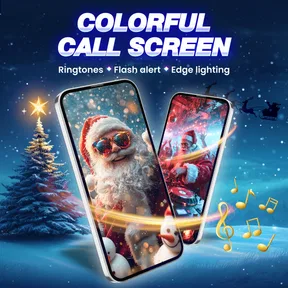
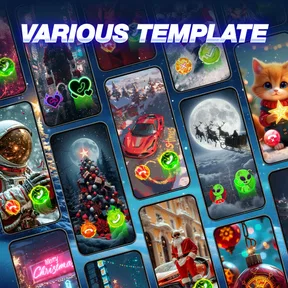
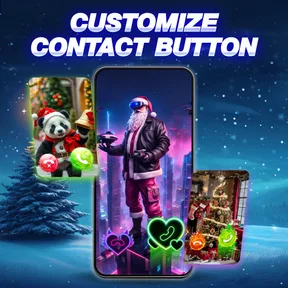
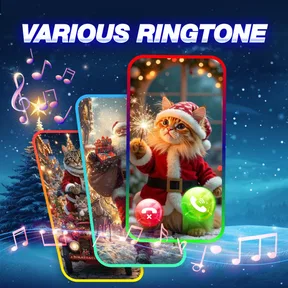


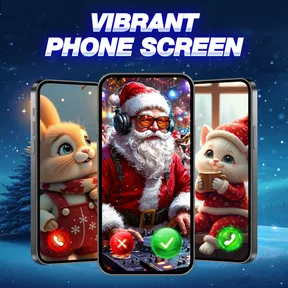
 Analysis by AppCompare
I can see why a colorful incoming-call screen grabs attention right away. Call Screen & Ringtones Music is a free personalization app that puts the look and sound of calls in focus, with effects for the call screen, flash alerts, and ringtones. Its appeal is easy to understand: instead of leaving every incoming call to the phone’s standard presentation, you can give that everyday moment a more individual feel. The harder question is whether that change still feels useful once the novelty wears off.
In my view, this app makes the most sense for someone who notices their phone’s visual details and enjoys changing them from time to time. It is less compelling if you want a quiet, untouched phone interface or a one-time ringtone change that you will never revisit. The customization is the point, but it also creates a small ongoing choice: what looks and sounds right for your calls now?
Why the first week feels fresh
The first appeal is that the app brings several call-related touches together. A themed screen changes the visual impression of an incoming call, while a ringtone changes its sound and a flash alert adds another way to draw attention. These are familiar parts of a phone, but presenting them as a coordinated personalization choice makes the experience feel more deliberate than changing one system setting and forgetting about it.
I would start with one change rather than reworking everything at once. Pick a call-screen look that suits your usual home screen, then try a ringtone that is distinct enough to recognize without becoming irritating. That simple pairing makes it easier to judge what you actually enjoy. If you switch the screen, sound, and alert style all at once, it can be hard to tell which change improved the experience and which one is just novelty.
A practical detail worth considering is where you use your phone. A flash alert may be useful when you are in a noisy place or have put the phone face down and want a visible signal. In a dim room, though, a conspicuous alert can feel distracting. I would treat it as a situational option rather than something every user needs enabled all the time. The best personalization is not always the most noticeable; it is the setup that helps without demanding attention.
The app is from Aesthetic Themes Apps, and its focus is narrower than a full home-screen makeover tool. That is a strength if you mainly want to change how calls look and sound, because you are not being asked to redesign every part of the phone. It is also a limitation: someone looking for a broad collection of widgets, icon packs, or general interface controls should compare it with a more comprehensive personalization app instead.
Make the changes fit real calls
One useful way to test a new setup is to think through the calls you actually receive. A ringtone that stands out at home may be too loud or awkward in a shared office. A dramatic visual effect may look fun while browsing options but feel excessive when a call arrives during a conversation. I prefer to choose for the places where I use my phone most, not just for the moment of setup.
Worth Reading Before You Choose

EA SPORTS FC Mobile 26 Is a Bigger Football Game, but It Takes Time

Flipboard Shows What News Apps Must Do Beyond the Feed

Switching to Android Auto Means Rethinking Your Driving Routine

Google Calendar Makes a Crowded Week Easier to Manage

Ludo King Makes the Most of the Minutes Between Plans

Baby Panda World Brings Quick Play to Modern Phones, but Its Game Library Feels Busy
For example, imagine you often keep your phone in a bag while commuting. A recognizable ringtone can help you identify your own device among nearby phones, while a visual alert may matter less if you cannot see the screen. At a desk, the reverse might be true: a visible signal could be convenient, while a loud ringtone would disturb people around you. Thinking in terms of those everyday situations helps turn customization into a practical decision rather than a collection of effects.
Call Screen & Ringtones Music is rated 4.4 on average, based on around 41,000 ratings, and has passed 10 million installs. Those figures suggest that this style of call personalization has broad appeal, but they do not tell me whether any particular theme will suit your taste. I would judge it by how quickly you can settle on a comfortable setup and whether you still like it after hearing and seeing it repeatedly.
A low-effort test before you commit
If you are unsure whether the app deserves a place on your phone, give each change a little time in ordinary conditions instead of judging it from a preview. A ringtone should be tested at the volume and in the rooms where you normally take calls; a sound that feels clear in a quiet bedroom can be too assertive in a shared space. Likewise, try a visual style when you are in a hurry to answer, not only when you have time to admire it.
This approach also helps answer a practical question: do you need to change everything together? I would not assume so. You may find that a new ringtone is enough, or that the default sound works fine while a different call-screen appearance is the only change you enjoy. Treating the options separately makes the result easier to maintain and reduces the chance that you keep a distracting feature simply because it came bundled with a look you like.
What remains useful after the novelty
Personalization apps can feel exciting for a few days and then disappear into the background. Here, the recurring value depends less on constant browsing and more on whether your chosen changes solve a small, repeated problem. A ringtone you can identify in a crowded place, or an alert that suits how you leave your phone at work, can keep earning its place. A flashy look that you only enjoyed while previewing it may not.
I would not recommend changing the call presentation every few days just to keep the app feeling new. Frequent switching makes it harder to build familiarity with a ringtone, and it can turn a simple phone setting into another thing to manage. Instead, choose a setup, live with it through ordinary routines, and revisit it when a season, setting, or personal preference genuinely changes. That approach gives the app a chance to prove its lasting value.
There is also a useful distinction between customization for yourself and customization for other people. If you often share your screen or take calls in public, a bold incoming-call effect may be visible to those around you. Someone who likes expressive phone styling may enjoy that. Someone who prefers a low-key device might find it draws attention they did not want. Neither preference is wrong, but the app is naturally better suited to the first kind of user.
The usual alternative is to stick with the phone’s built-in call display and choose a standard ringtone in system settings. That route is simpler and often better for someone who wants reliability without extra visual styling. This app is worth considering when the built-in presentation feels dull and you want the call screen, ringtone, and flash-alert idea to be part of the same personalization routine. It should be an enhancement, not a reason to compromise the calm or clarity you expect from calls.
Keep upkeep small and expectations sensible
The ongoing maintenance is mostly a matter of taste: deciding whether your current look still suits you and whether a sound remains pleasant after repeated use. I would keep a mental note of the setup that works rather than endlessly chasing a “perfect” combination. A ringtone that is instantly recognizable is often more useful than one that is merely unusual, and a clean visual choice can age better than an effect that competes with the caller information.
Before settling on a theme, check how it feels in both bright and low-light settings and consider whether the screen remains easy to read at a glance. This is a small but worthwhile test for any call-screen customization. If the decoration makes it harder to notice who is calling or respond quickly, the aesthetic benefit is not paying for itself. The best result should still feel like a phone call first and a personal touch second.
Price is another part of the long-term calculation. The app is free to install, while optional in-app purchases range from $0.99 to $24.99 per item. I would explore the free experience and decide whether the app has become part of your routine before spending on extras. A purchase makes more sense when you know exactly what you want from the customization, rather than while you are still browsing out of first-week curiosity.
It is also sensible to remember that a personalization layer is not essential to placing or receiving calls. If your priority is a minimal setup, fewer things to adjust, or a standard interface that already works well for you, leaving the phone as it is may be the better choice. The app’s value is subjective by design: it gives more room for personal taste, but that freedom only matters if you enjoy using it.
Where it can become tiring
Repeated sounds are the clearest source of fatigue. A ringtone may seem lively during setup and become grating after hearing it through routine calls. I would avoid choosing purely for novelty, especially if you receive frequent calls. A familiar, comfortable sound is easier to live with than one that grabs attention every time, and the freedom to customize does not mean every call needs a dramatic soundtrack.
Visual effects can also lose their charm when they are too busy or do not match how you use the phone. If the incoming-call screen feels less readable than the default, or if its style clashes with the rest of your device, the novelty can turn into friction. That is why I see restraint as a useful skill here: a small, coherent change can feel personal without making the phone feel unfamiliar.
Flash alerts are especially dependent on context. They may help when you cannot hear a ringtone, but a visible pulse is not automatically helpful in every room or situation. If you are trying to keep your phone discreet, or you find visual alerts distracting, the feature may be more annoyance than assistance. I would only keep it in the routine if it addresses a real problem in the places where you use the device.
The app is rated for Everyone, and its current version is 2.2.4, with Android 8.0 or later listed as the minimum operating-system requirement. It is a straightforward fit for Android users who want this kind of call-focused personalization; it is not a general answer for someone seeking a complete phone redesign. That distinction is useful before installing: decide whether calls are the part of your device you actually want to personalize.
Who should keep it installed
I would keep Call Screen & Ringtones Music on a phone when its chosen screen style or ringtone continues to make calls more recognizable or more enjoyable without becoming a distraction. It is a good match for people who like expressive themes, appreciate having call-related options grouped around one purpose, and are willing to adjust their choices to suit work, home, and public settings.
I would skip it if you rarely notice your call screen, prefer the default look, or want a set-and-forget phone with no extra personalization decisions. I would also look elsewhere if your main goal is to customize the entire interface rather than calls specifically. In those cases, the built-in settings or a broader personalization option may be a better fit, even if they offer less emphasis on call effects.
For a more specific test, consider a day when you move between a quiet home, a busy commute, and a shared workplace. You might keep the ringtone restrained for other people’s sake, use a visible alert only when the phone is out of sight, and choose a screen design that remains legible in a quick glance. If that mix sounds helpful, the app gives you a focused place to shape those call-related choices. If you would rather avoid managing different preferences as your surroundings change, the phone’s standard setup is likely more comfortable.
One trade-off I would keep in mind is that a distinctive ringtone can solve one problem while creating another: it may help you recognize your own phone, but it can also make your calls more noticeable to everyone nearby. The same applies to a bold screen effect when the phone is on a table. I would choose the least conspicuous option that still gives you the benefit you want, rather than treating maximum visibility as the goal.
Overall, I see this as a small quality-of-life app rather than something that transforms how a phone works. Its early appeal is visual and immediate; its lasting value comes from a practical choice you keep enjoying, such as a ringtone you recognize or an alert that suits your routine. Start modestly, judge it through real calls, and spend only if the options genuinely earn a place in your daily use. If that sounds like your kind of customization, Call Screen & Ringtones Music is worth trying. If you are drawn only to the initial spectacle, the default call screen may serve you just as well.
Pros
- Quickly personalize incoming calls with different ringtones and screen styles.
- A useful way to make important callers easier to recognize.
- Combines call-screen customization and ringtone features in one app.
- Offers a more distinctive look than the phone’s standard incoming-call screen.
- Can help make a frequently used phone feel more personal.
Cons
- Some features or themes may require in-app purchases.
- Customization options may vary depending on your phone and Android version.
- A full-screen caller display may feel distracting during other activities.
- Ringtones and themes can take up extra storage space.
- May request access to contacts
- phone
- or media to provide its features.
FAQs for Call Screen & Ringtones Music
What does Call Screen & Ringtones Music do?
Call Screen & Ringtones Music is designed to personalize incoming calls with visual call-screen styles and ringtone options. Depending on the version and your device, you may be able to choose a background or theme for the caller screen, select a ringtone, and adjust related call-alert settings. Available features can differ by app version, Android or iOS support, and device permissions, so check the app listing before downloading.
How do I set a ringtone or call-screen theme?
After installing the app, browse its available ringtone or call-screen choices and preview them before selecting one. The app may ask for permission to access settings or manage call-related features so your choices can be applied. Exact steps vary by phone and operating-system version; if an option does not appear to take effect, check the app’s instructions and your device’s default Phone, sound, and notification settings.
Does Call Screen & Ringtones Music work on both Android and iPhone?
Availability and functionality depend on the version offered for your platform. Android generally allows more third-party customization of call screens and system sounds, while iOS restricts how apps can change the incoming-call interface and default ringtone. Before downloading, confirm that the app is listed for your device and review its stated compatibility, supported features, and system requirements rather than assuming every feature works identically on both platforms.
What permissions might the app request, and should I be concerned?
A customization app may request access to sound settings, notifications, contacts, or phone-related functions, depending on the features it offers and your operating system. Grant only permissions that make sense for the feature you want to use, and review the app’s privacy information to understand how data is handled. You can usually review or revoke permissions later in your device settings, though doing so may limit some features.
Is Call Screen & Ringtones Music free, and does it contain ads or in-app purchases?
Pricing can vary by store, region, and app version. Some personalization apps are free to install but show advertisements, offer optional purchases, or reserve certain themes and sounds for a paid tier. Check the current Google Play or App Store listing for pricing, subscriptions, in-app purchases, and cancellation terms before downloading. Also review recent user feedback, since the available catalog and monetization model may change over time.


